This guide is what worked for us and the people we've helped — it is not legal advice, and we are not legal professionals. Rules change, every situation is different, and the cost of getting it wrong (denied visas, double taxation, fines, missed deadlines) is real.
Before you act on anything here, speak with a qualified legal professional — an immigration lawyer (abogado de extranjería), a cross-border tax accountant, or a licensed gestor — who can review your specific facts. Use this guide to know what questions to ask, not as a substitute for paid advice.
A certificado digital is a software identity file installed in your browser or operating system. When a Spanish government website asks who you are, your machine presents this file, cryptographically signs the request, and the administration treats it as the legal equivalent of you standing at the counter with your passport. It is your electronic signature and your login, in one.
The most common version for individuals and sole traders is the Certificado de Persona Física issued free by the FNMT-RCM (Fábrica Nacional de Moneda y Timbre — Real Casa de la Moneda), the state mint. There is no fee for the individual certificate. Companies pay a small fee for a certificado de representante.
What it unlocks, in rough order of how soon you will need it: filing and paying your Modelo 303 / 130 / 100 at the AEAT tax agency; requesting your vida laboral and managing autónomo status at the Seguridad Social; downloading your empadronamiento certificate instead of queuing at the town hall; booking and tracking immigration files at the Sede Electrónica de Administraciones Públicas; signing contracts and grant applications; registering a company; accessing your regional health service records; and responding to any notificación electrónica the state sends you.
That last one matters more than people expect. Once you are an autónomo or an administrator of an SL, the administration is entitled to notify you electronically only. A notification you never opened is still legally served after ten calendar days. Without a certificate you cannot open them, and the first you hear of a problem is an enforcement letter with surcharges attached.
Three things it is not. It is not the same as your NIE (a number) or your TIE (a card). It is not a Cl@ve account, although they overlap — see the comparison below. And it is not tied to a phone, so losing your phone does not lose your identity.
Spain has three parallel electronic identity systems and almost every official site accepts some combination of them. Knowing which does what saves you a lot of confusion.
Certificado digital (FNMT). A file on your computer. Works with every administration without exception, including the ones Cl@ve does not cover. Can legally sign documents, not just log in. Can be exported to other devices. This is the one to get. It expires and must be renewed.
Cl@ve. A government login service — either Cl@ve PIN (a one-time code sent to the Cl@ve app or by SMS, valid for a short session) or Cl@ve Permanente (a username plus password plus SMS code). Fast to obtain, convenient for routine tax filings, but not accepted everywhere, and it is generally tied to a Spanish mobile number. Cl@ve is typically available only to people with a DNI or NIE already registered in the system.
DNIe / TIE with chip. Spanish nationals have a certificate embedded in the DNI chip; you need a card reader. Most foreign residents' TIE cards do not carry a usable certificate, so this route rarely applies to expats.
Our recommendation: get the FNMT certificate first because it works everywhere and can sign. Then register for Cl@ve as a convenient day-to-day backup for the AEAT, and because Cl@ve registration also makes certain online identity checks possible. The two do not conflict.
One useful nuance: if you already hold a valid FNMT certificate, you can register for Cl@ve online in two minutes using the certificate, with no appointment. The reverse also helps — from 2024 onward the FNMT allows certificate issuance via video-identification for some applicants, sidestepping the in-person visit entirely. Check both options before you book anything.
You need a NIE or DNI. The certificate is issued against a Spanish identification number. If your NIE is still pending, this whole process waits. A white A4 certificado de NIE is fine; you do not need the plastic TIE card yet, though bring both if you have them.
Your NIE must be legible and exact. The FNMT form is unforgiving about format. Foreign residents' numbers usually begin with X, Y or Z followed by seven digits and a check letter (e.g. Y1234567X). Enter it with no spaces, no dashes, and with the letters uppercase. A single mismatch against the police database silently fails your identity check later.
Your name must match your identity document character for character — including both surnames if your documents show two, and including accents. If your passport says José and you type Jose, the accreditation office may reject you, and you will have wasted the appointment.
Use a real computer, not a phone or tablet. The request and the download must happen on the same machine, same browser, same user account, and neither iOS nor Android handles the key generation properly. Pick the laptop you will actually keep.
Disable the cleaning tools. Do not run CCleaner, do not clear cookies, do not use a private/incognito window, and do not let the machine be reset or reimaged between the request and the download. The private key that makes the certificate work is generated on your machine during step one and sits in the browser profile until you download it. Destroy it and you start over.
Install the FNMT configurator first. The FNMT provides a small application (Configurador FNMT-RCM) for Windows, macOS and Linux that handles key generation in modern browsers. Download it from the official sede.fnmt.gob.es site only, install it, and restart the browser before you begin.
Budget a week. The request takes fifteen minutes, the accreditation appointment is where you wait, and the download takes five minutes. In a small town you may be seen the next day; in Barcelona or Madrid, plan for one to three weeks to get a slot.
Go to the FNMT electronic office at sede.fnmt.gob.es and follow Certificados → Persona Física → Obtener Certificado Software → Solicitud vía internet de su Certificado.
Enter three things: your NIE or DNI, your first surname exactly as it appears on your document, and an email address you control permanently. Use a personal address, not a work one you might lose, and not an alias you will forget — the same address is required again at download and at renewal.
Accept the conditions of use and submit. The site generates a key pair on your computer and shows you a código de solicitud — a nine-digit request code — which is also emailed to you.
Save that code in three places: screenshot it, write it on paper, and keep the email. You cannot complete the process without it, it cannot be reissued, and the accreditation office will ask for it before anything else.
Common failure at this step: the browser reports that it cannot generate the key. Nine times out of ten the configurator is not installed, or the browser was not restarted after installing it, or you are in a private window. Install, restart, retry in a normal window.
A second common failure: the form rejects your surname. If you have two surnames on your Spanish documents, try the first surname only; if your passport shows a single surname, enter it exactly as printed. Do not add your middle name.
The FNMT will not hand over an identity to an anonymous web request. You must accredit yourself through one of three routes.
Route A — In person at an accreditation office (the standard route). Thousands of offices accredit identity: AEAT tax offices, Seguridad Social offices, many town halls, and some regional government offices. The FNMT site has an Oficinas de Acreditación map — always use it rather than guessing, because the list changes.
Bring: your código de solicitud (printed or on screen), your passport plus your TIE/NIE certificate (bring both — some clerks insist on the physical TIE), and the completed accreditation form if the office publishes one. Non-EU citizens are normally required to present a valid TIE; a NIE-only paper may be refused for the residency-linked certificate at some offices, so bring everything you have.
Book a cita previa. AEAT offices require one — book at sede.agenciatributaria.gob.es under Cita previa, choosing the trámite for certificate accreditation. Seguridad Social offices book separately. Some town halls still take walk-ins; call before travelling.
At the desk the clerk checks your document against the request code and signs off. It takes about five minutes. You will not receive the certificate there — accreditation only releases the download.
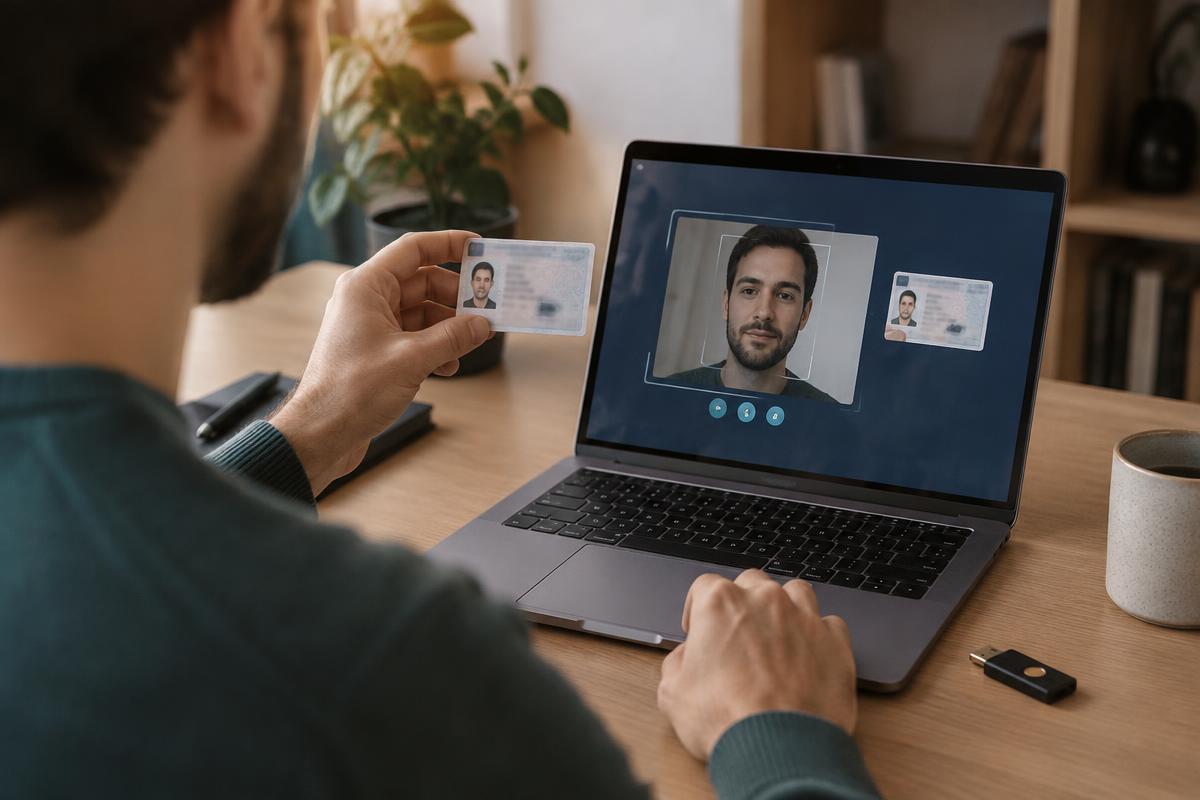
Route B — Video-identification (no appointment). The FNMT offers a paid video-identity option through its site for applicants who cannot attend in person. It runs from your computer with a webcam, typically completes the same day, and carries a modest fee (roughly a few euros) rather than being free. Worth it if the nearest cita is three weeks away and a filing deadline is not.
Route C — With your DNIe or an existing certificate. If you already hold any valid certificate, you can request and accredit the new one entirely online with no visit. This is the renewal path most people use from year two onwards.
Wait at least one hour after accreditation — the FNMT documents this delay and downloading too early simply fails.
Return to the same computer, same browser, same user profile you used for the request. Go to Certificados → Persona Física → Descargar Certificado, and enter the same NIE, the same first surname, and the same código de solicitud.
Accept the terms, and the certificate installs itself into the browser or system keystore. On Windows in Chrome or Edge it lands in the Windows certificate store; on macOS in Safari or Chrome it lands in Keychain Access; in Firefox it lands in Firefox's own internal store, which is separate from the operating system.
Verify it immediately. The FNMT site has a Comprobar estado del certificado check. Better still, go to the AEAT site and log in with the certificate — if the tax agency greets you by name, it works.
Note your expiry date now. The individual FNMT certificate is valid for a limited period (currently four years for the persona física software certificate) and renewal is only possible in a window before it expires — typically the last sixty days. Put a calendar reminder at the eleven-month-before mark and another a month before expiry. Miss the window and you repeat the whole in-person process from scratch.
This is the step almost everyone skips and roughly a third of people later regret. The certificate lives on one machine. A dead laptop, a wiped browser profile or a new computer means starting again with a new appointment.
Export it to a file. In Firefox: Settings → Privacy & Security → Certificates → View Certificates → Your Certificates → Backup. In Windows: Manage user certificates → Personal → Certificates, right-click → All Tasks → Export, and crucially choose "Yes, export the private key". On macOS: open Keychain Access, find the certificate, right-click → Export, and choose the .p12 format.
You will be asked for a password. Set a strong one and store it in your password manager — the exported .p12 / .pfx file is useless without it, and the file plus the password together are your legal identity in Spain. Treat that pair like a passport.
Store two copies in different places — for example your password manager's encrypted file vault and an encrypted drive at home. Do not email it to yourself, do not leave it in a plain cloud folder, and never send it to a gestor over WhatsApp.
Import it on your second device the same day, so you know the backup actually works: double-click the .p12 on Windows or macOS, or use Firefox's Import button, and enter the password. A backup you have never restored is not a backup.
If you share administration with a partner or spouse, each of you needs your own certificate — they are personal and non-transferable. Handing your .p12 to someone else so they can file on your behalf is legally your signature on their actions.
Install Autofirma. Many procedures ask you to sign a PDF or a form rather than just log in, and Spain's official signing application is Autofirma, distributed free from the Portal de Administración Electrónica (firmaelectronica.gob.es). Install it once; the browser will hand off to it automatically when a site requests a signature. If a government page hangs at "esperando a Autofirma", the app is not installed or the browser blocked the handoff — allow the protocol prompt.
Browser reality check. Chrome and Edge work well on Windows. Firefox needs the certificate imported into Firefox specifically. Safari on macOS is usable but historically the most fragile — if a page misbehaves, try Chrome before concluding the certificate is broken.
AEAT (Hacienda). With the certificate you can file Modelo 303 (quarterly VAT), Modelo 130 (quarterly income tax payments), Modelo 100 (annual return), request certificados de estar al corriente that landlords and clients ask for, and set up direct debit for payments. Our autónomo quarterly taxes guide walks through the filings themselves.
Seguridad Social. Access Import@ss to download your vida laboral, change your autónomo contribution base, and manage sick leave. Registering as autónomo online requires the certificate — see Starting a Business in Spain.
Electronic notifications. Enrol in the Dirección Electrónica Habilitada única (DEHú) and, separately, check the AEAT's own notification inbox. Set both to email you when something arrives, then actually check monthly. The ten-day deemed-service rule is the single most expensive trap for new autónomos.
Immigration and town hall. The Sede Electrónica de Administraciones Públicas accepts the certificate for TIE-related filings, and most town halls let you pull an empadronamiento certificate instantly instead of booking a visit — see Empadronamiento in Spain.
"Su solicitud no ha podido ser procesada" at request time. Almost always the configurator, an incognito window, or a browser extension blocking scripts. Restart in a clean normal window with the configurator installed.
The accreditation office says your code is invalid. Codes are tied to the exact NIE and surname you typed. If you mistyped either, no office can fix it — request a new code from scratch, which is free and takes fifteen minutes.
Download fails after a successful accreditation. Check three things in order: did you wait an hour; are you on the same browser profile you requested from; and has anything cleared your cookies or browser data since. If the machine was reimaged or the profile deleted, the private key is gone and you must repeat from step one.
The certificate installed but sites do not see it. Firefox keeps its own store — import it there specifically. On Chrome for macOS, confirm it is in the login keychain rather than System, and that the private key is present (expand the entry in Keychain Access; you should see a key underneath).
"Certificado revocado" or "no válido". Either it expired, or it was revoked because your underlying document changed. Renewing your TIE or changing your legal name can invalidate a certificate — reissue after any status change.
You are locked out with a deadline looming. Two escapes: register for Cl@ve PIN (much faster to obtain if you have a Spanish mobile and a registered NIE) and file with that, or authorise a gestor who holds a certificado de representante to file on your behalf. Our hiring a gestor guide covers what that should cost.
Renewal. From year two you can renew entirely online with the existing certificate, inside the renewal window, with no appointment. Do not let it lapse — a lapsed certificate means a new in-person accreditation, and the cita queue does not care about your deadline.
If you do nothing else today, do this in order.
1. Confirm your NIE is issued and note it exactly, with the check letter. 2. Install the Configurador FNMT-RCM on the laptop you intend to keep, and restart the browser.
3. Submit the request at sede.fnmt.gob.es and save the código de solicitud in three places. 4. Immediately book your accreditation cita — the AEAT queue is the long pole, so book it before you do anything else.
5. Attend with passport, TIE and the code. 6. Wait an hour, download on the same browser, and confirm by logging into the AEAT. 7. Export a password-protected .p12, store it in two safe places, and restore it once on a second device to prove it works.
8. Install Autofirma, register for Cl@ve using your new certificate, enrol in electronic notifications, and set a calendar reminder for renewal.
That is the whole thing. It costs nothing but the appointment, and it converts most of Spanish bureaucracy from a morning in a queue into a five-minute task at your kitchen table.
Stuck on a step, or got a Spanish error message you cannot decode? Contact us — we have been through this on both a Mac and a Windows machine, and we will tell you what we would try next.